In the fast-paced world of e-commerce, adaptability is not just a strength—it’s a necessity. Over the past decade, businesses have leaned on platforms like Magento for their flexibility and customization power. However, as customer expectations evolve and operational simplicity becomes critical, many store owners are re-evaluating their tech stack.
Enter Shopify—a powerful, user-friendly platform that’s quickly become the gold standard for growing online businesses. Whether you’re a solo entrepreneur or managing a team, Shopify’s cloud-based system offers the speed, integrations, and scalability modern e-commerce demands.
This guide will walk you step-by-step through the Magento to Shopify migration process—helping you avoid common pitfalls, maintain SEO rankings, and relaunch with confidence.
Why Businesses Are Switching from Magento to Shopify
Let’s face it: Magento is robust—but with great power comes great complexity.
While Magento shines in custom development and enterprise-level flexibility, it often demands significant technical knowledge, server management, and a team of developers. For many small to mid-sized businesses, this becomes expensive and time-consuming.
Top Reasons Store Owners Are Making the Switch:
Ease of Use: Shopify’s drag-and-drop interface requires zero coding knowledge.
Lower Cost of Ownership: No need to pay for hosting, updates, or patches.
Faster Go-to-Market: Set up a professional-looking store in hours, not weeks.
Built-in Features: From payment gateways to SEO tools, Shopify comes ready-to-go.
App Ecosystem: Thousands of apps to extend functionality without hiring a developer.
Shopify provides high-speed hosting with nearly perfect uptime, ensuring your store runs smoothly and stays accessible.
🔍 Real-World Example:
A boutique fashion brand in Los Angeles migrated from Magento to Shopify in 2023. The team reported a 60% reduction in development costs and a 20% increase in conversion rates within the first 3 months post-migration—thanks to faster page speeds and a cleaner mobile interface.
Key Differences Between Magento and Shopify
Before diving into migration, it’s critical to understand the structural and functional differences between the two platforms.
Feature Magento Shopify
Hosting Self-hosted (you manage servers) Fully hosted
Ease of Use Requires technical expertise Beginner-friendly
Customization Highly customizable (via code) Customizable via themes & apps
Security You handle PCI compliance Shopify handles it
SEO Tools Advanced but requires manual setup Built-in with automated tools
Development Time Slower, requires dev team Faster, plug-and-play
Shopify offers a streamlined path to launch and scale, while Magento is better suited for those with specific, complex backend needs.
Common Challenges in Magento to Shopify Migration
Transferring an online store involves more than just duplication—it requires rebuilding from the ground up.
Being aware of potential roadblocks will help you prepare better.
⚠️ Common Migration Hurdles:
Data Format Differences: Product, customer, and order structures vary across platforms.
SEO Risks: Improper redirection can tank search engine rankings.
Custom Functionality Loss: Magento’s open-ended customization may not always translate one-to-one.
Design Inconsistencies: Shopify themes differ in structure; expect design adaptation.
Extension Gaps: Not every Magento extension has a Shopify equivalent.
Training Staff: Shopify is intuitive, but your team still needs onboarding.
Think of migration as rebuilding a house using some of the same materials, but with a new blueprint.
4. Pre-Migration Planning: Laying the Groundwork
Migration success hinges on preparation. Rushing into it without a solid plan could result in data loss or functional gaps.
🛠️ Key Pre-Migration Steps:
Back Up Your Magento Store:
Export all data manually or use backup plugins.
Store it securely (cloud + offline drive).
Create a Full Inventory:
List products, categories, customer data, orders, pages, and media files.
Identify key attributes (e.g., tags, SKUs, variants, tax settings).
Define Your “Must-Have” Features:
Which custom features do you use daily?
Is there an equivalent on Shopify or through a third-party app?
Choose the Right Shopify Plan:
Start with the Basic plan for new ventures, move to Shopify as you grow, and opt for Advanced to handle high-volume operations.
Also consider Shopify Plus if you’re coming from Magento Commerce.
Select a Theme (or Plan a Custom Design):
Choose a fast, mobile-optimized theme from Shopify’s store.
Or collaborate with a Shopify expert to rebuild your unique look.
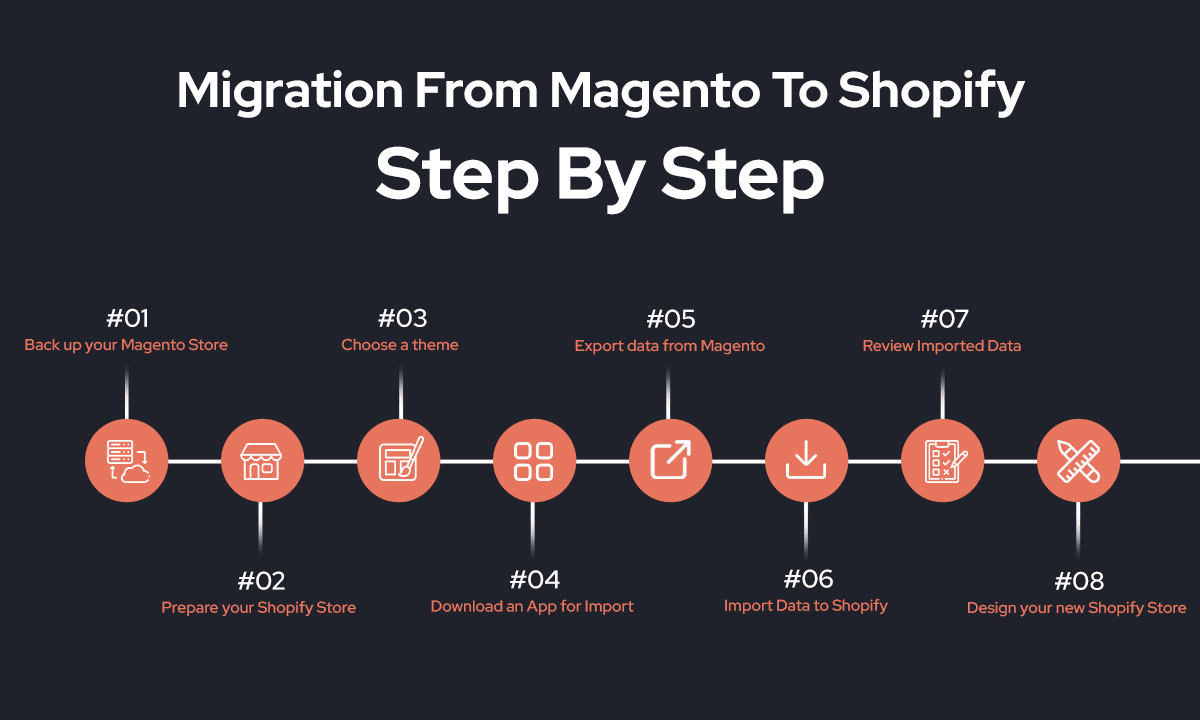
The Step-by-Step Magento to Shopify Migration Process
Here’s the meat of your journey—let’s break it down from setup to launch.
Step 1: Set Up Your Shopify Store
Create your Shopify account.
Select a plan that fits your needs—you can begin with a free trial to explore the features.
Install a theme and configure general settings (language, currency, taxes, shipping, etc.).
Step 2: Export Magento Data
Use Magento admin panel or CLI tools to export:
Products (CSV/XML)
Customers
Orders
Content (Pages, Blogs)
Reviews, Coupons, and more
Step 3: Import Data into Shopify
You have three main options:
Shopify’s Native Import App
Third-Party Tools (e.g., LitExtension, Cart2Cart)
Manual Import (for small stores or full control)
Verify that all product details—such as variants, pricing, images, and categories—are accurately migrated.
Manually clean up anything that doesn’t map over cleanly.
Step 4: Rebuild Your Design
Recreate your Magento layout using a Shopify theme or a custom-coded layout.
Focus on mobile usability and clean navigation.
Step 5: Set Up Redirects
Redirect old URLs to Shopify using 301 redirects.
Shopify’s “URL Redirects” feature makes this easy.
Leverage Google Search Console to track crawl issues and identify any broken links on your site.
Step 6: Reinstall or Replace Functionalities
Install Shopify apps to replace Magento extensions.
Consider apps for:
Reviews (Judge.me, Loox)
Email Marketing (Klaviyo, Omnisend)
SEO (Plug In SEO, Yoast)
Step 7: Test Everything
Go through a full shopping experience on desktop and mobile.
Test:
Checkout process
Payment gateways
Email notifications
Discount codes
Shipping and tax logic
Don’t launch until all systems work flawlessly.
Preserving SEO and Analytics
Your store’s SEO equity is one of its most valuable digital assets. Mishandling migration can harm rankings, traffic, and revenue.
SEO Best Practices During Migration:
Preserve URL Structures: Maintain existing slugs where possible.
Use 301 Redirects: These signal to Google that content has permanently moved.
Update your sitemap and submit it again through Google Search Console for reindexing.
Verify Domain Ownership: Set up Google Analytics and GSC immediately post-migration.
Check Page Speed: Shopify’s hosted infrastructure typically performs better, but test each page with PageSpeed Insights.
Post-Migration Checklist
You’ve crossed the finish line—but the race isn’t over yet. The days following migration are critical.
📋 Final Checklist:
Double-check product info and images
Validate customer data accuracy
Announce your relaunch via email & social media
Monitor analytics for traffic dips or spikes
Collect customer feedback and resolve issues quickly
Begin new CRO experiments tailored to Shopify
Create blog content to re-engage SEO
Think of the first 30 days as your soft relaunch phase.
Benefits of Shopify Over Magento: A Recap
After migration, many store owners report a noticeable lift in performance, speed, and peace of mind.
💡 Key Advantages Shopify Offers:
Simple Admin Interface: Easier staff training and onboarding.
Hosted Infrastructure: No need to deal with downtime or servers.
Built-in SEO & Marketing Tools: Email, social selling, analytics out of the box.
Extensive App Store: Add new features instantly, no coding needed.
Mobile Optimization: All themes are responsive and performance-tuned.
Lower Total Cost of Ownership: Save on developers, hosting, and maintenance.
Around-the-clock support through live chat and comprehensive help documentation.
🧠 Insight: Shopify is not just an e-commerce platform—it’s a growth engine for modern digital brands.
Conclusion: Is Magento to Shopify Migration Right for You?
If your current Magento store feels like a burden—or if you’re spending more time fixing technical issues than growing your business—Shopify offers a breath of fresh air.
With the right planning, tools, and testing, your migration can be seamless. More than just a technical move, switching from Magento to Shopify often marks the beginning of a new growth phase.
Ready to switch?
Whether you’re doing it yourself or hiring experts, take that step confidently.
🚀 Need help with your migration?
Contact our certified Shopify experts today and let us take care of the heavy lifting while you focus on growing your business.